
HTTP Request Enrichments
What are HTTP Request Enrichments?
HTTP Request Enrichments allow you to enrich your dataset using any HTTP service. This allows you to build enrichments using any service that Activations may not natively support. Similar to AI columns and other enrichments, Activations allows you to configure a HTTP request that is unique to each row in your dataset, and map the response back to a column. The enrichment is stored and materialized back in your warehouse.
Example Use Cases
Identifying Anonymous Traffic
Generating insights from anonymous usage is one of the most common requests a data team will receive from marketing. Connect to a service like MaxMind which takes browser event information such as IP address and provides geographic information so you can determine where in the world traffic is coming from.
Address Verification
Using invalid data to run campaigns is like lighting money on fire. Taking the time to verify that addresses, both email and physical, are valid before running campaigns can save a lot of money and increase ROAS as a result. Doing that once in your source of truth is the most efficient approach. Now any of your downstream deduping (ER benefits here!), segments, campaigns, and syncs to destination services can rely on having the most accurate and standardized address verification. Even the US Postal Service offers an API for this.
Integrating Internal Services
HTTP Enrichment isn't limited to working with public data provider companies. You can enrich from any JSON API endpoint, which means you can also use private APIs your company already offers. For companies with existing APIs to support their existing apps or microservice architecture, you can now easily integrate API data into your data warehouse ondemand without relying on a separate ETL process. Use this to connect to an internal API that returns live inventory availability or connect to your proprietary recommendation algorithm to connect product recommendations for retention campaigns.
HTTP Request Enrichments are currently supported for Snowflake, Redshift, BigQuery, Databricks, and Postgres.
Creating a HTTP Request Enrichment
For this example, we will use MaxMind to enrich website event data with geographic information.
Defining a HTTP Request Connection
- Login to Activations and select a Dataset you want to enrich on the Datasets tab
- Ensure that your dataset has a Unique ID Column. You can configure this by setting the Type and Property Mappings on the Dataset
- On the top right corner, navigate to Enrich & Enhance > Enrichments > HTTP Request
- Create a new HTTP Request Connection, or select an existing connection that you want to use
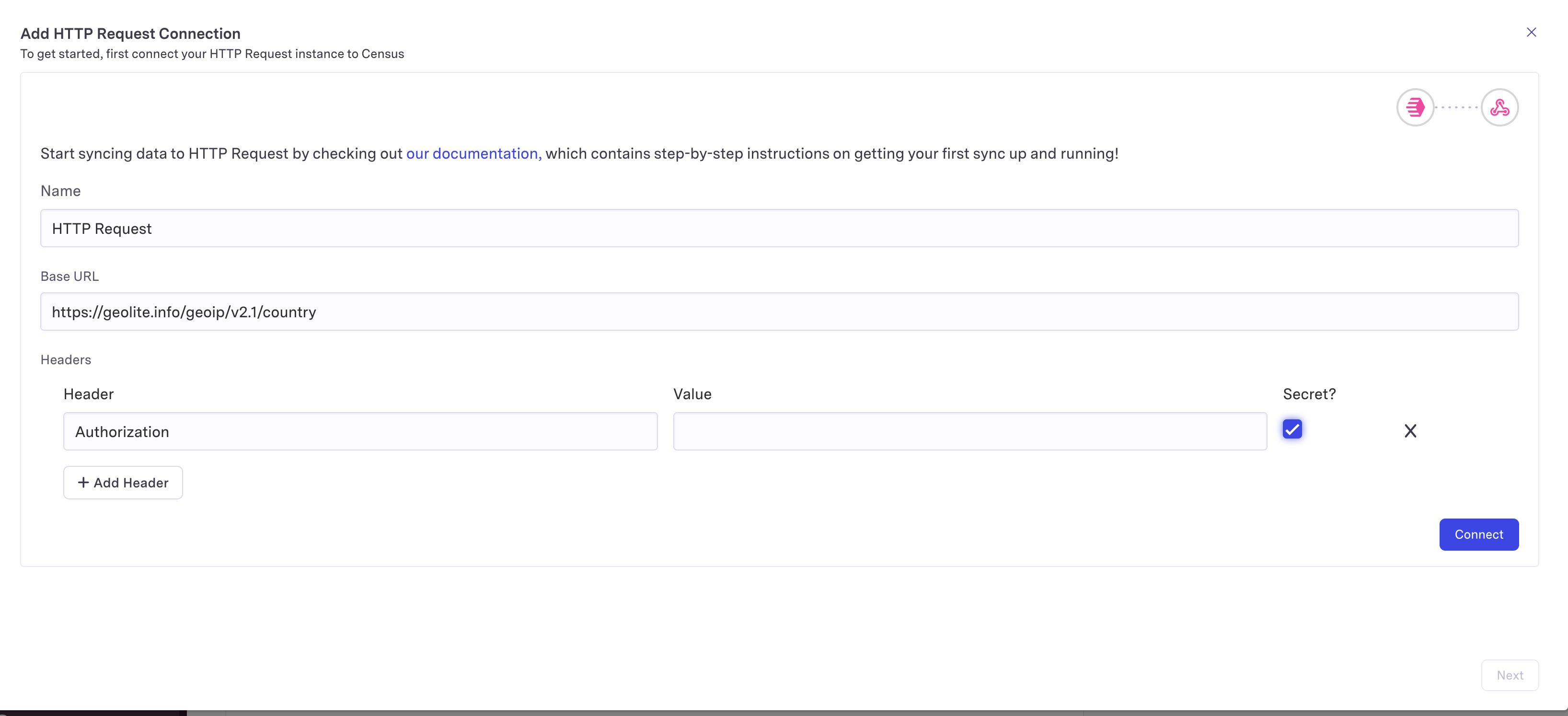
- For MaxMind, we will use their GeoLite API: https://geolite.info/geoip/v2.1/country
- You will need to add an Authorization Header in the form
Basic <base64 encoding of``ACCOUNT_ID:LICENSE KEY>.You can generate a new license key through the MaxMind accounts portal. See MaxMind's docs on Authorization for more information.
When creating a new HTTP Request Connection, you will be asked to input the static Base URL and any other Headers required for your request. Note that the static Base URL does not include the endpoint, as this may be a dynamic value that will be configured in the next step
Example:
Say you want to query from https://geolite.info/geoip/v2.1/country/192.168.123.132. In this case, the Base URL is https://geolite.info/geoip/v2.1/country and the endpoint is 192.168.123.132
Defining the Request
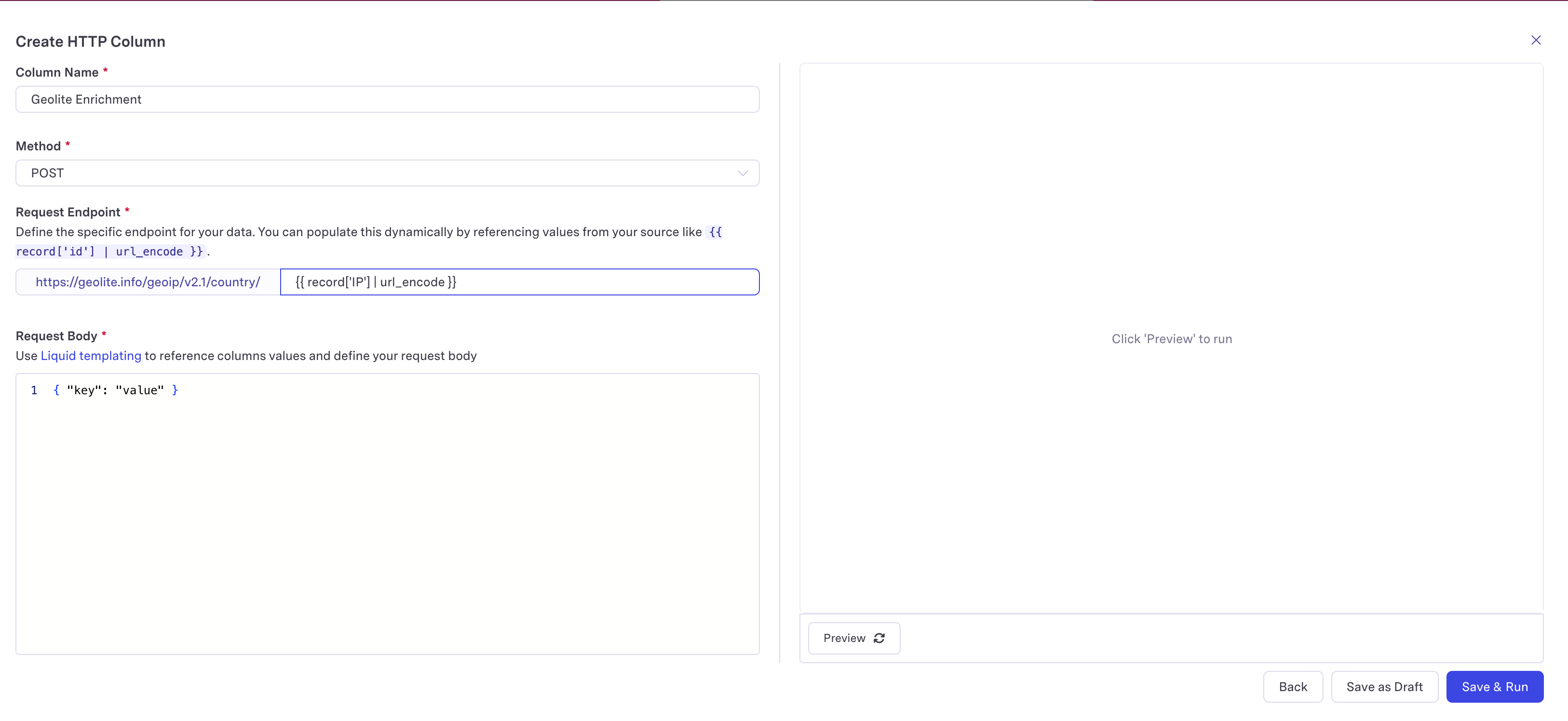
- Once you have your HTTP Request Connection selected, you can begin setting up your HTTP request
- Name your enrichment
- Choose an HTTP method, ex.
GET - Configure your endpoint. This could be a constant value, or use Liquid Templates to encode record values in your endpoint. Note that the
url_encodeLiquid Filter should be used to ensure that any special characters in your data will be parsed properly to be used in the URL - If your chosen HTTP method supports defining a request body (ex.
POST), you can also use Liquid Templates to reference column values for each row.
The request body should be a valid JSON object.
Defining the Response
It is expected that the response from the endpoint is a JSON object.
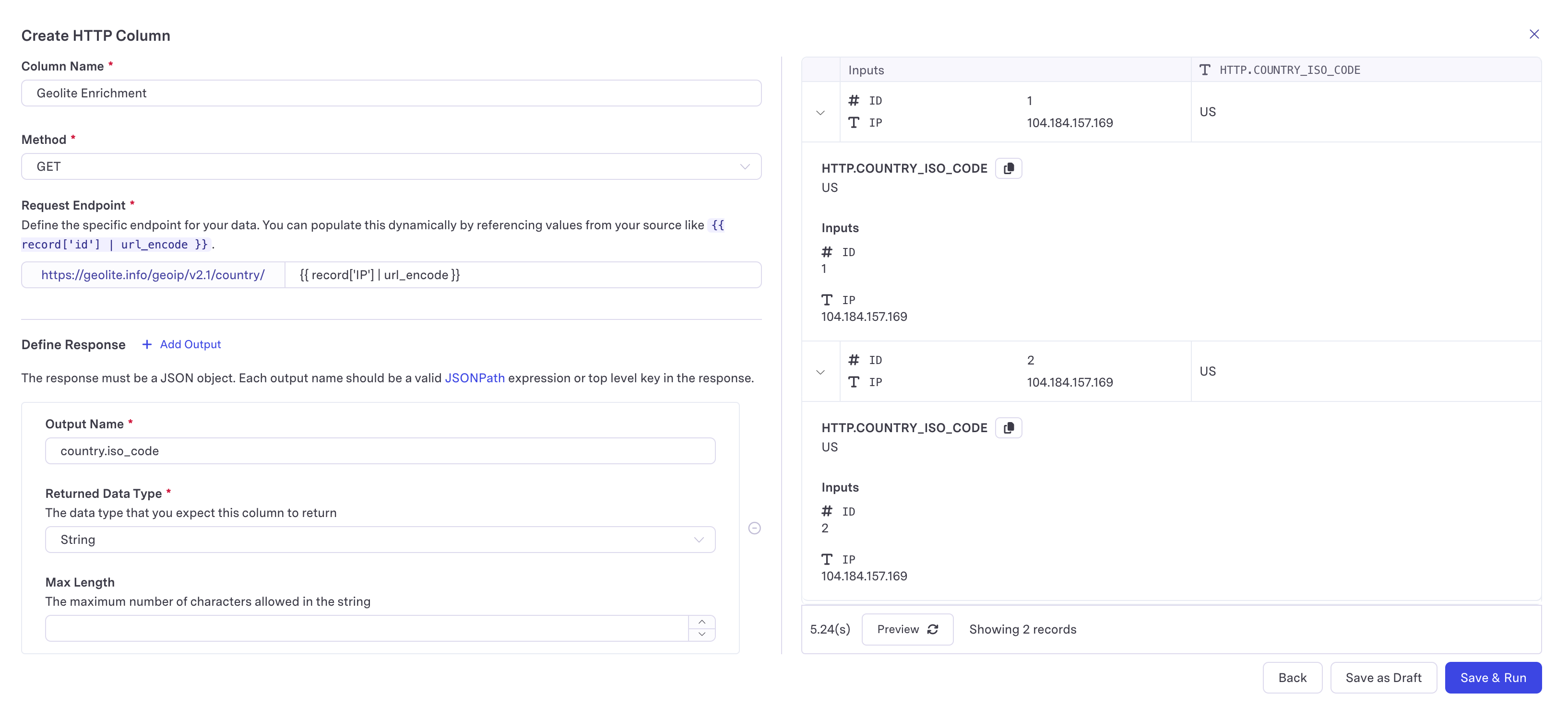
- Define each column of your enrichment by mapping the output names to keys in the returned JSON object. Each output name can be either a:
- Top level key of the JSON object
- A valid JSONPath pointing to a nested value in the JSON object
Example
Let's say the you had an endpoint https://somewebsite.com/x returns the following example response:
{
    "lang": "EN",
    "country": {
        "iso_code": "US",
    }
}
Then here are the values you would get back for each out output name:
- Output name:
lang - Returned data type:
String - Returned value:
EN
- Output name:
country - Returned data type:
JSON String - Returned value:
{"iso_code":"US"}
- Output name:
country.iso_code(using JSONPath syntax) - Returned data type:
String - Returned value:
US
Final Steps
- Once you are done configuring your request and response, you can go ahead and create your HTTP Column!
Behind the scenes, Activations will set up a table in your warehouse to store your enriched data. Activations will also create a sync configuration that runs your enrichment and writes it into the created table.