
Sigma Integration
Connect Sigma to Activations and sync data directly from Sigma Workbooks
You can connect Activations directly to Sigma which allows you to build Workbooks with their powerful visual builder and then sync the data to any of your business apps Activations refreshes data from Sigma whenever a sync is run so your data is always up to date.
Set up
To connect Sigma to Activations, you'll need two things:
- An existing Activations data warehouse connection that matches the data warehouse used by Sigma. See the below section on about permissions.
- Sigma API credentials for the user that has access to the Workbooks you plan to use in Activations.
To generate API keys for Activations, visit Administration under the profile menu in the top right and then choose APIs & Embed Secrets at the bottom of the left navigation, and click Create New. Select API Token as the type and then provide a memorable name and description.
This will generate a Client ID and Client Secret. You will need to provide both to Activations. Please copy both to a safe place as you will not be able to access them within Sigma again.
Connecting Activations to Sigma
Now back in Activations, select Sources from the left navigation bar and, if you have multiple warehouse connections, click on the Projects button of the one that matches your Sigma instance.

Once you click on Projects, click the Sigma Workbooks tab. You'll see a Connect Sigma button to start the process. From here, simply provide your credentials.
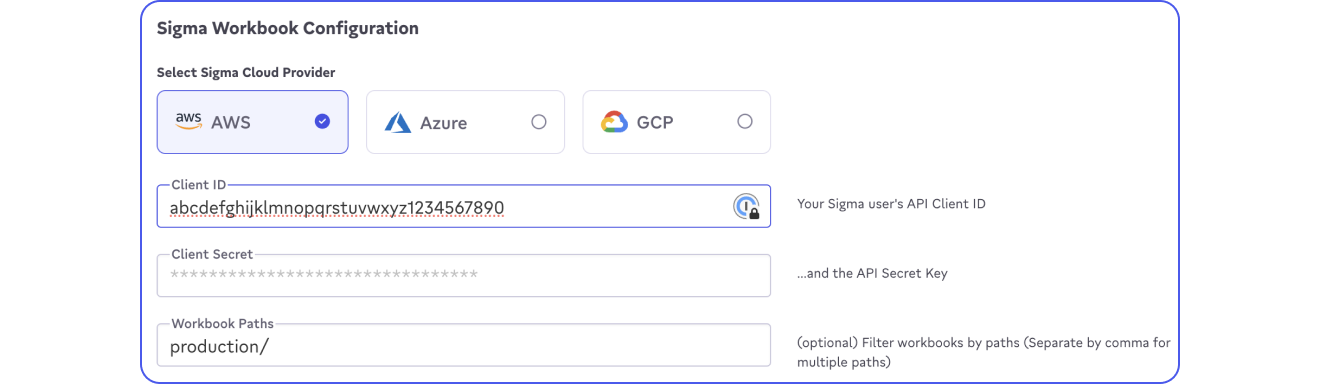
Once saved, Activations will scan your Sigma environment looking for Workbooks. Each individual Element within a Sigma Workbook will be accessible as an individual model in Activations. If you don't see a workbook or element you were expecting, make sure the user that generated the API token has access to that workbook, otherwise Activations will not be able to see it.
Required data warehouse permissions
Activations and Sigma both maintain their own data warehouse credentials and connections which means each can have different permissions. However, Activations requires the same permissions your Workbooks use within Sigma. If Activations is missing some permissions that Sigma has, you may see a permissions error in Activations when attempting to preview the model or use it in a sync.