
Ad Reporting dbt Package
This dbt package transforms data from Fivetran's Ad Reporting connector into analytics-ready tables.
Resources
- Number of materialized models¹: 10
- Connector documentation
- dbt package documentation
- dbt Core™ supported versions
>=1.3.0, <3.0.0
What does this dbt package do?
This package enables you to standardize schemas from various ad platform connectors and create reporting models for clicks, spend and impressions aggregated to the account, campaign, ad group, ad, keyword and search levels. It creates enriched models with metrics focused on cross-platform advertising performance analysis.
Currently supports the following Fivetran ad platform connectors:
- Amazon Ads
- Apple Search Ads
- Facebook Ads
- Google Ads
- LinkedIn Ad Analytics
- Microsoft Advertising
- Pinterest Ads
- Reddit Ads
- Snapchat Ads
- TikTok Ads
- Twitter Ads
NOTE: You do not need to have all of these connector types to use this package, though you should have at least two. Additionally, individual platform models may include platform-specific metrics and fields that are better suited for deeper, platform-level analysis.
Output schema
Final output tables are generated in the following target schema:
<your_database>.<connector/schema_name>_ad_reporting
Final output tables
By default, this package materializes the following final tables:
| Table | Description |
|---|---|
ad_reporting__account_report | Represents daily performance aggregated at the account level across all advertising platforms, including spend, clicks, impressions, and conversions.Example Analytics Questions:
|
ad_reporting__campaign_report | Represents daily performance aggregated at the campaign level across all advertising platforms, including spend, clicks, impressions, and conversions.Example Analytics Questions:
|
ad_reporting__ad_group_report | Represents daily performance aggregated at the ad group level across all advertising platforms, including spend, clicks, impressions, and conversions.Example Analytics Questions:
|
ad_reporting__ad_report | Represents daily performance at the individual ad level across all advertising platforms, including spend, clicks, impressions, and conversions.Example Analytics Questions:
|
ad_reporting__keyword_report | Represents daily performance at the individual keyword level across search advertising platforms, including spend, clicks, impressions, and conversions.Example Analytics Questions:
|
ad_reporting__search_report | Represents daily performance at the individual search query level across search advertising platforms, including spend, clicks, impressions, and conversions.Example Analytics Questions:
|
ad_reporting__url_report | Represents daily performance at the individual URL level across all advertising platforms, including spend, clicks, impressions, and conversions, with UTM parameter tracking.Example Analytics Questions:
|
ad_reporting__monthly_campaign_country_report | Represents monthly performance aggregated at the campaign level by country across all advertising platforms, including spend, clicks, impressions, and conversions, with standardized ISO-3166 country names.Example Analytics Questions:
|
ad_reporting__monthly_campaign_region_report | Represents monthly performance aggregated at the campaign level by region across all advertising platforms, including spend, clicks, impressions, and conversions.Example Analytics Questions:
|
¹ Each Quickstart transformation job run materializes these models if all components of this data model are enabled. This count includes all staging, intermediate, and final models materialized as view, table, or incremental.
Visualizations
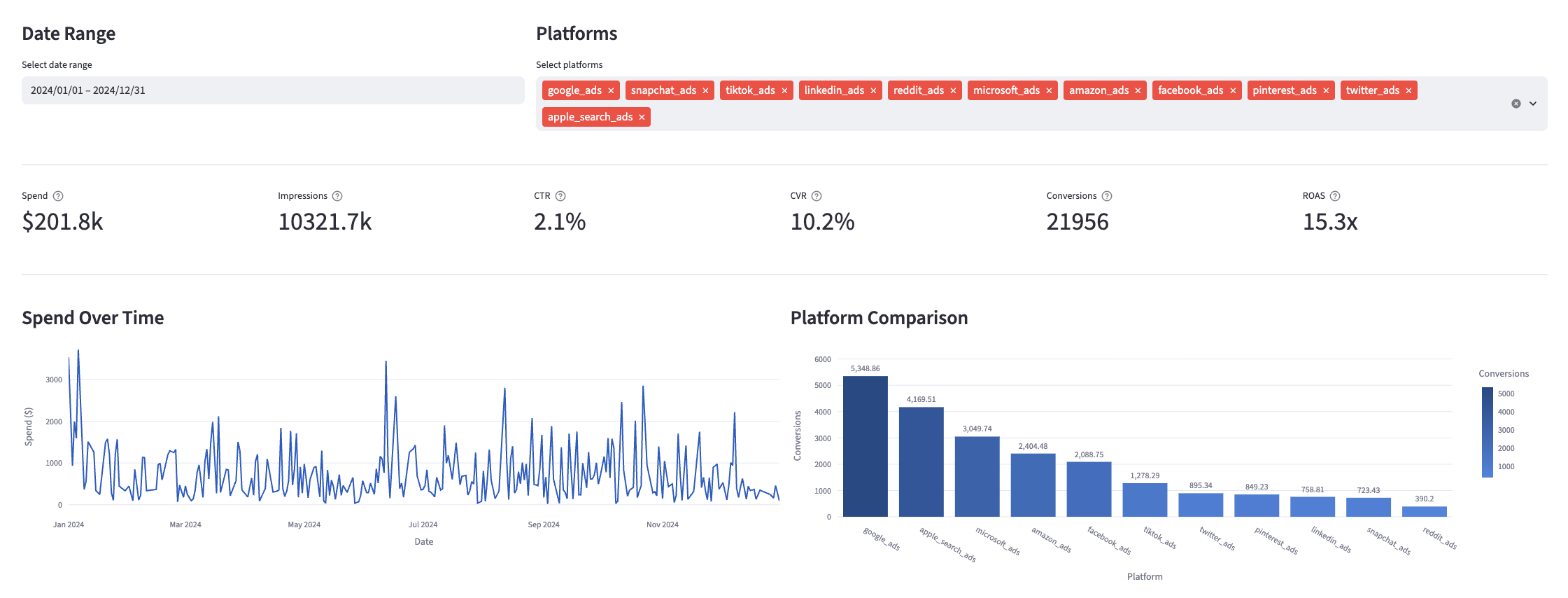
Many of the above reports are now configurable for visualization via Streamlit. Check out some sample reports here.
Materialized Models
Each Quickstart transformation job run materializes the following model counts for each selected connector. The total model count represents all staging, intermediate, and final models, materialized as view, table, or incremental:
| Connector | Model Count |
|---|---|
| Ad Reporting | 10 |
| Amazon Ads | 30 |
| Apple Search Ads | 26 |
| Facebook Ads | 34 |
| Google Ads | 29 |
| LinkedIn Ad Analytics | 25 |
| Microsoft Advertising | 33 |
| Pinterest Ads | 34 |
| Reddit Ads | 34 |
| Snapchat Ads | 29 |
| TikTok Ads | 22 |
| Twitter Ads | 32 |
Timezone Considerations
Timezone differences across ad platforms impact standardization due to pre-aggregated data and non-standard timezones. See the Decision Log - Timezone Considerations for details.
Prerequisites
To use this dbt package, you must have the following:
- At least one of the below supported Fivetran ad platform connections syncing data into your destination. This package currently supports:
While you need only one of the above connectors to utilize this package, we recommend having at least two to gain the rollup benefit of this package.
- A BigQuery, Snowflake, Redshift, Postgres, or Databricks destination.
How do I use the dbt package?
You can either add this dbt package in the Fivetran dashboard or import it into your dbt project:
- To add the package in the Fivetran dashboard, follow our Quickstart guide.
- To add the package to your dbt project, follow the setup instructions in the dbt package's README file to use this package.
How is this package maintained and can I contribute?
Package Maintenance
The Fivetran team maintaining this package only maintains the latest version of the package. We highly recommend you stay consistent with the latest version of the package and refer to the CHANGELOG and release notes for more information on changes across versions.
Opinionated Decisions
In creating this package, which is meant for a wide range of use cases, we had to take opinionated stances on a few different questions we came across during development. We've consolidated significant choices we made in the DECISIONLOG.md, and will continue to update as the package evolves. We are always open to and encourage feedback on these choices, and the package in general.
Contributions
A small team of analytics engineers at Fivetran develops these dbt packages. However, the packages are made better by community contributions.
We highly encourage and welcome contributions to this package. Learn how to contribute to a package in dbt's Contributing to an external dbt package article.
Contributors
We thank everyone who has taken the time to contribute. Each PR, bug report, and feature request has made this package better and is truly appreciated.
A special thank you to Seer Interactive, who we closely collaborated with to introduce native conversion support to our Ad packages.