
Facebook Ads dbt Package
This dbt package transforms data from Fivetran's Facebook Ads connector into analytics-ready tables.
Resources
- Number of materialized models¹: 34
- Connector documentation
- dbt package documentation
- dbt Core™ supported versions
>=1.3.0, <3.0.0
What does this dbt package do?
This package enables you to better understand the performance of your ads across varying grains and produces modeled tables that leverage Facebook Ads data. It creates enriched models with metrics focused on account, campaign, ad set, ad, and geographic reporting.
Note: If you do not have your Facebook Ads connection schema change settings set to
Allow all, it is very possible that you are missingbasic_ad_actionsorbasic_ad_action_values. If you would like to surface conversion metrics in your Facebook and/or Ad Reporting models, please ensure these reports are syncing. Otherwise, theconversionsandconversions_valuefields will benull.
Output schema
Final output tables are generated in the following target schema:
<your_database>.<connector/schema_name>_facebook_ads
Final output tables
By default, this package materializes the following final tables:
| Table | Description |
|---|---|
facebook_ads__account_report | Represents daily performance aggregated at the account level, including spend, clicks, impressions, and conversions.Example Analytics Questions:
|
facebook_ads__campaign_report | Represents daily performance aggregated at the campaign level, including spend, clicks, impressions, and conversions.Example Analytics Questions:
|
facebook_ads__ad_set_report | Represents daily performance aggregated at the ad set level (equivalent to ad groups in other platforms), including spend, clicks, impressions, and conversions.Example Analytics Questions:
|
facebook_ads__ad_report | Represents daily performance at the individual ad level, including spend, clicks, impressions, and conversions.Example Analytics Questions:
|
facebook_ads__country_report | Represents daily performance aggregated at the account level by country, including spend, clicks, impressions, and conversions, enriched with geographic context.Example Analytics Questions:
|
facebook_ads__region_report | Represents daily performance aggregated at the account level by region, including spend, clicks, impressions, and conversions, enriched with geographic context.Example Analytics Questions:
|
facebook_ads__url_report | Represents daily performance at the individual URL level, including spend, clicks, impressions, and conversions, enriched with ad context. By default, excludes ads with NULL url values.Example Analytics Questions:
|
facebook_ads__url_tags | Represents unique combinations of creative_id and corresponding URL tag key-value pairs, providing UTM and custom parameter tracking. Excludes creatives without URL tags. Example Analytics Questions:
|
¹ Each Quickstart transformation job run materializes these models if all components of this data model are enabled. This count includes all staging, intermediate, and final models materialized as view, table, or incremental.
Visualizations
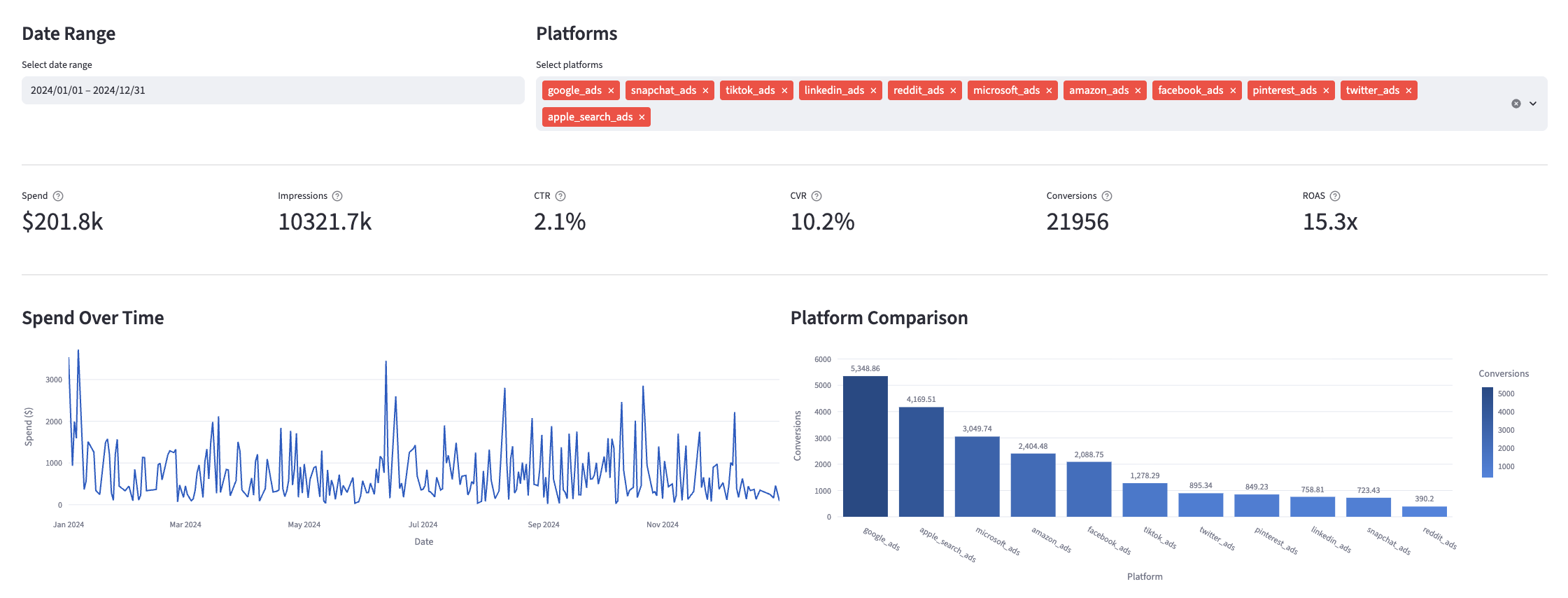
Many of the above reports are now configurable for visualization via Streamlit. Check out some sample reports here.
Prerequisites
To use this dbt package, you must have the following:
- At least one Fivetran Facebook Ads connection syncing data into your destination.
- A BigQuery, Snowflake, Redshift, PostgreSQL, or Databricks destination.
- You will need to configure your Facebook Ads connection to pull the
basic_adpre-built report and its childbasic_ad_actionsandbasic_ad_action_valuespre-built reports. These pre-built reports should be enabled in your connection by default. However, to confirm these reports are actively syncing you may perform the following steps:- Navigate to the connection schema tab in Fivetran.
- Search for
basic_ad,basic_ad_actions, andbasic_ad_action_valuesand confirm they are all selected/enabled. If you would like country and region-level transformations, do the same fordemographics_country,demographics_country_actions,demographics_region, anddemographics_region_actions. - If not selected, do so and sync. If already selected you are ready to run the models!
How do I use the dbt package?
You can either add this dbt package in the Fivetran dashboard or import it into your dbt project:
- To add the package in the Fivetran dashboard, follow our Quickstart guide.
- To add the package to your dbt project, follow the setup instructions in the dbt package's README file to use this package.
How is this package maintained and can I contribute?
Package Maintenance
The Fivetran team maintaining this package only maintains the latest version of the package. We highly recommend you stay consistent with the latest version of the package and refer to the CHANGELOG and release notes for more information on changes across versions.
Contributions
A small team of analytics engineers at Fivetran develops these dbt packages. However, the packages are made better by community contributions.
We highly encourage and welcome contributions to this package. Learn how to contribute to a package in dbt's Contributing to an external dbt package article.
Contributors
We thank everyone who has taken the time to contribute. Each PR, bug report, and feature request has made this package better and is truly appreciated.
A special thank you to Seer Interactive, who we closely collaborated with to introduce native conversion support to our Ad packages.