


Private Networking
Private networking services enable you to sync data from your source to your destination without exposing traffic to the public internet. In the Private Networking tab of the Fivetran dashboard, you can view all private networking connections associated with your account.
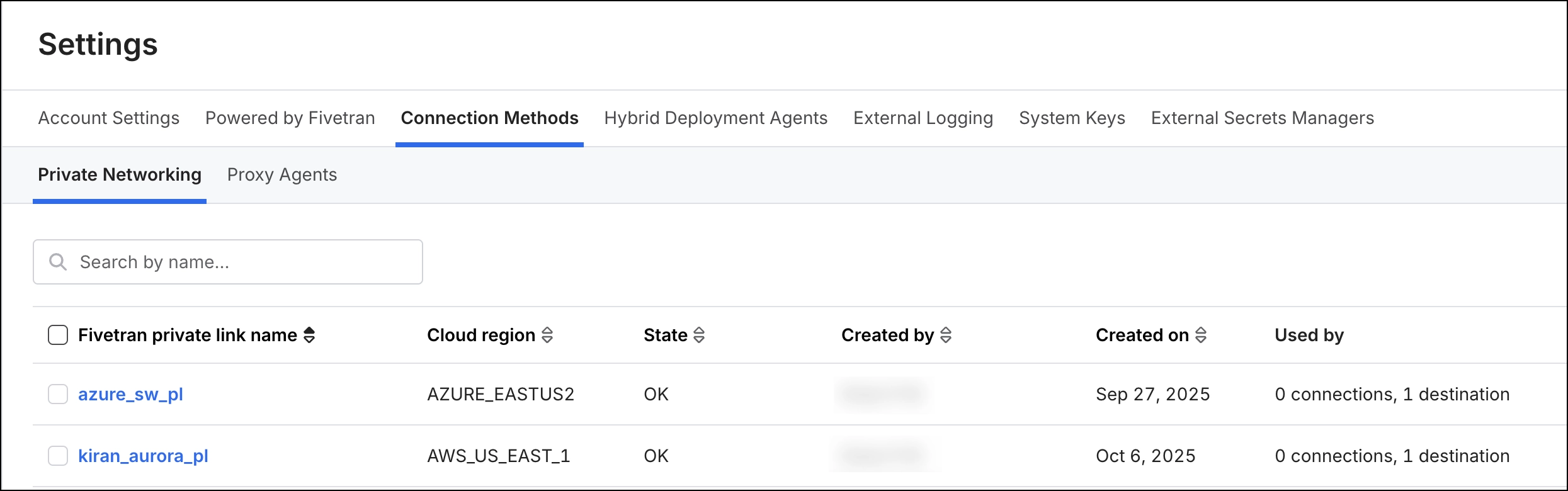
Connection list
The connection list displays all connections created by you or other users in your account, with the following details:
Fivetran private link name: Name of the private networking connection.
Cloud region: Cloud region where Fivetran provisions and manages this connection method.
State: Current status of the connection. Possible values:
- INITIATION: Initial state that a new or recently edited private networking object (AWS PrivateLink, Azure Private Link, or Google Cloud PSC) enters while Fivetran builds and validates connection.
- OK: The private networking connection is running and successfully communicating with Fivetran.
- FAIL: The private networking connection is not reachable or is not responding to Fivetran.
Created by: User who created the connection.
Created on: Date when the connection was created.
Used by: Lists of Fivetran objects that reference this connection method:
- Shows the destination name if linked to a destination.
- For source-side PrivateLink or tunnel configurations, the list displays the connections using it. If multiple connections use the same connection method, it displays the count (for example, 3 connections).
You can make adjustments to the connections list view in the following ways:
Search the connection list by connection name using the search bar.
Sort the connection list by clicking the column headers.
Delete a connection method from the connection list using the check box corresponding to it.
You cannot delete a connection method if it is being used by other Fivetran resources. The checkbox is disabled when a connection method is in use.
Connection detailed view
When you click a list item in the connection list view, it opens in the detailed view. This view shows detailed information about the private link.
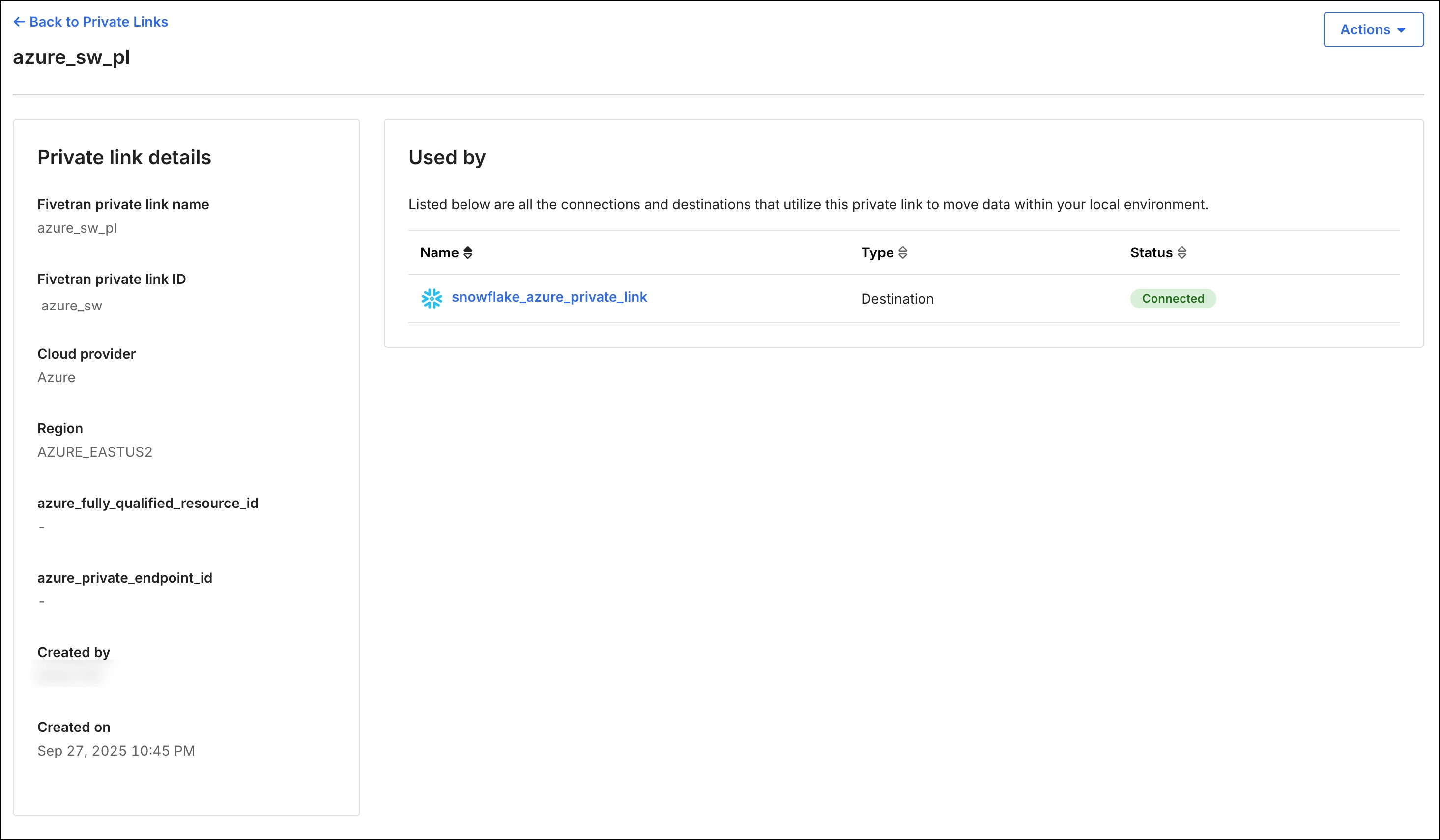
The layout is organized into two panels:
Private link details: Displays all information related to the connection’s private link.
For AWS Private link connection:
- Fivetran private link name: Name of the AWS private link connection.
- Fivetran private link ID: The unique identifier for the private link within the Fivetran system.
- Cloud provider: The cloud provider to which your private link connection is connected.
- Region: Region where Fivetran hosts the worker VPC and the private link.
- vpc_endpoint_service_name: Name of the VPC endpoint.
- host: DNS name that Fivetran creates for every AWS private link object.
- vpc_endpoint_id: A unique identifier for the VPC endpoint within the Fivetran system.
- Created by: User who created the connection.
- Created on: Date when the connection was created.
For Azure Private link connection:
- Fivetran private link name: Name of the Azure private link connection.
- Fivetran private link ID: The unique identifier for the private link within the Fivetran system.
- Cloud provider: The cloud provider to which your private link connection is connected.
- Region: Region where Fivetran hosts the private link.
- host: DNS name that Fivetran creates for every Azure private link object.
- azure_fully_qualified_resource_id: Resource-ID that you specified while setting up your Azure private link connection.
- azure_private_endpoint_id: A unique identifier that Fivetran assigns to every Azure private link upon creation.
- Created by: User who created the connection.
- Created on: Date when the connection was created.
For Google Cloud Private Service connection:
- Fivetran private link name: Name of the GCP private link connection.
- Fivetran private link ID: The unique identifier for the private link within the Fivetran system.
- Cloud provider: The cloud provider to which your private link connection is connected.
- Region: Region where Fivetran hosts the private link.
- host: DNS name that Fivetran creates for every GCP private link object.
- Google Private Service Connection ID: A unique identifier that Fivetran assigns to every Google Cloud Private Service Connect (PSC) link upon creation.
- Google Private Service Connect ID: A unique identifier that Google Cloud Private Service Connect (PSC) assigns to every private link upon creation.
Used by: Displays details about the connection or destination that uses the private link.
Actions: Allows you to delete a private Link from Fivetran. You cannot delete a private link if it is associated with any Fivetran connection or destination. The delete option is disabled in this case.