


Proxy Agents
The Fivetran Proxy Agent eliminates the need for other complex networking options. In the Proxy Agent tab of the Fivetran dashboard, you can view all Proxy Agent connections associated with your account.
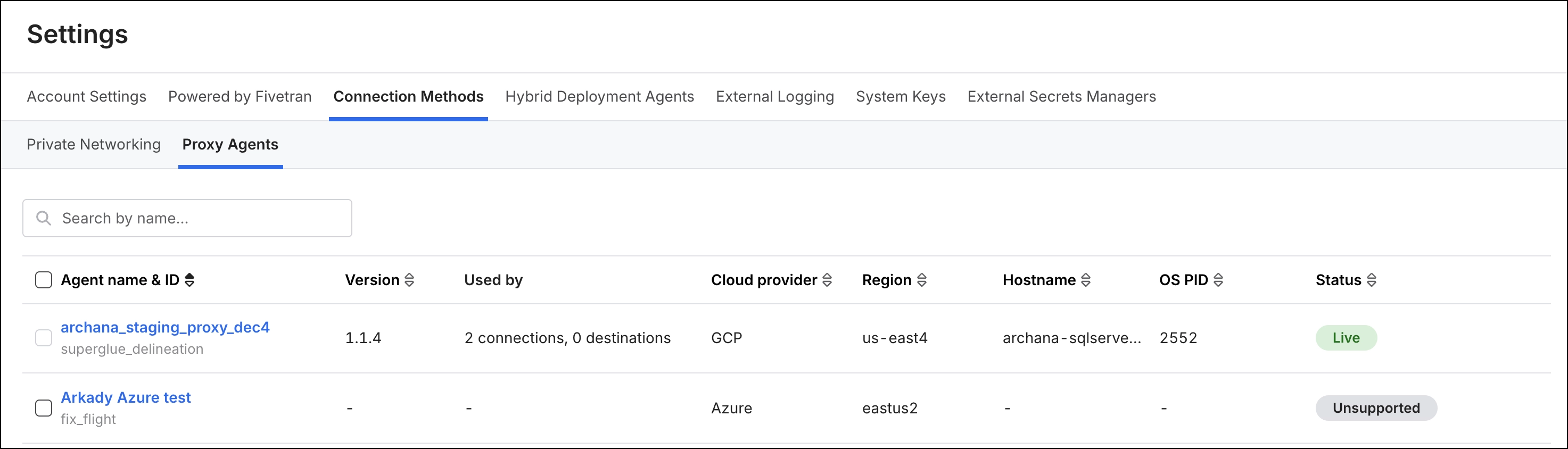
Connection list
The connection list displays all connections created by you or other users in your account, with the following details:
Agent name & ID: Name of the connection.
Version: The software version of the Proxy Agent
Used by: Lists of Fivetran objects that reference this proxy agent.
- Shows the destination name if linked to a destination.
- For source-side proxy agent configurations, the list displays the connections using it. If multiple connections use the same proxy agent, it shows the count (for example, 3 connections).
Cloud provider: The cloud provider where the agent’s Fivetran ingress endpoint resides (AWS, GCP, or Azure).
Hostname: The operating system hostname reported by the agent process to Fivetran.
OS PID: The numeric identifier assigned by the operating system to the running Proxy Agent process.
Status: Current status of the Proxy agent connection. Every 5 minutes, Fivetran checks whether the Proxy Agent is running and reachable. Possible values:
- Live: The Proxy Agent is running and successfully communicating with Fivetran.
- Offline: The Proxy Agent is not reachable or is not responding to Fivetran
- Unregistered: The Proxy Agent has never connected to Fivetran, so no data is available.
- Unsupported: The Proxy Agent version doesn't support status monitoring. Upgrade to Proxy Agent version 1.1.4 or later, or High Volume Agent version 6.1.0_90 or later.
You can make adjustments to the connections list view in the following ways:
Search the connection list by connection name using the search bar.
Sort the connection list by clicking the column headers.
You can delete a connection method from the connection list using the check box corresponding to it.
You cannot delete a connection method if it is being used by other Fivetran resources. The checkbox is disabled when a connection method is in use.
Connection detailed view
When you click a list item in the connection list view, it opens in the detailed view. This view shows detailed information about the proxy agents. The layout is organized into two panels:
- Agents details: Displays all information related to the connection’s proxy agent.
- Used by: Displays details about the connection or destination that uses the proxy agents.
- Action: Allows you to delete a proxy agent configuration from Fivetran if the agent is not associated with any Fivetran connections.