
Datadog Integration
Monitor your syncs in Datadog
With Activations' Datadog integration, you can centralize your monitoring and alerting within one tool. Activations will emit metrics and events that help you understand the health of your data pipelines, alert on anomalies, and manage incidents.
The Datadog integration is accessible for Enterprise Plan accounts. If you would like to enable this integration and are not on the Enterprise Plan, please contact our support team.
Set up
To set up your Datadog integration:
- Navigate to your workspace's Settings > Integrations tab.
- Click to configure your Datadog integration for this workspace.
- Authenticate with your Datadog account via OAuth.
You're done! Metrics and events will start flowing to Datadog with every sync.
Recommended Datadog Dashboard
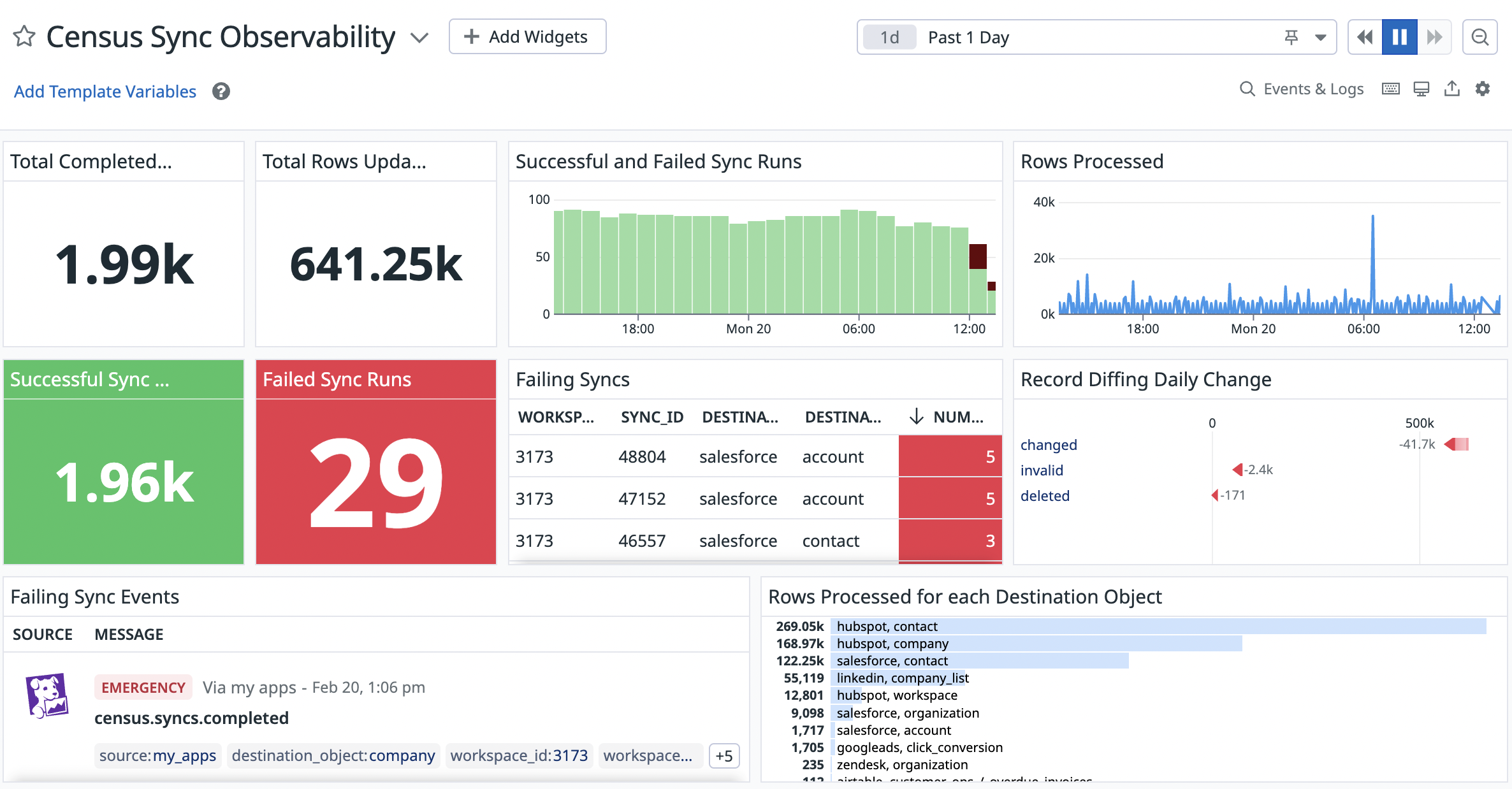
Datadog's Approved Partner Integration Dashboard for Activations Observability
To view a dashboard of recommended, actionable reports on top of your Activations Datadog metrics -- you may take advantage of the Activations (formerly Census) listing on the Datadog Integrations marketplace.
Simply:
- Log into your Datadog account.
- Head to the Integrations tab, and search for Census.
- Click to "Install" the Integration.
- Navigate to your list of dashboards. You'll now see the dashboard "Activations Sync Observability" available in your account!
Any data previously sent through the integration will populate these reports.
Metrics and Events
Activations sends the following to Datadog:
Metrics
- census.syncs.sync_completed - the number of syncs that have completed over a time window
- census.syncs.rows_processed - the volume of rows processed in your syncs, useful for anomaly detection
- census.syncs.records_sent - the volume of records synced to your destinations, also useful for anomaly detection
- census.syncs.sync_duration_from_scheduled_start_time - the time in seconds it took for a sync to complete once it was expected to begin, including time spent waiting in our job queue
- census.syncs.sync_duration_from_actual_start_time - the time in seconds it took for a sync to complete once it was picked up from the job queue
Events
- census.syncs.triggered - this event signals that the sync run has been queued
- census.syncs.started - this event signals that active work on the sync run has started
- census.syncs.completed - this event signifies that the sync run has completed, and is fired for both successful and failed sync runs.
- Successful syncs will have
status: ok - Failed syncs will have
status: emergency
- Successful syncs will have
- census.syncs.success - this event is fired on a successfully completed sync run
- census.syncs.failed - this event is fired on a failed sync run
Tags
These will be present for both metrics & events:
- sync_run_id - your sync run's ID
- workspace_id - your workspace's immutable ID associated with the metric / event
- workspace_name - your workspace's name associated with the metric / event
- sync_id - your sync's immutable ID, also searchable in the Management API and Sync Logs
- sync_behavior - how the sync is updating your destination's records (for example, upsert, update, mirror)
- destination_type - the destination you're updating with a sync (for example, Salesforce, Google Sheets, ...)
- destination_id - the ID of the destination connection
- destination_object - the object you're updating within the destination (for example, Account, User, ...)
- destination_object_id - the ID of the object you're updating within the destination
- is_full_sync - a boolean flag to indicate whether or not this sync is expected to be a full sync because either a user requested it or the sync is backfilling a newly added column
For the census.syncs.sync_completed metric only:
- status - whether the sync was a success or failure
For the census.syncs.rows_processed metric only:
- type - containing the following potential values
- changed - new or updated records that Activations will try to sync
- deleted - the number of removed records that Activations will try to delete if the sync behavior is "mirror"
- invalid - the number of records with a duplicate or NULL identifier in the sync
For the census.syncs.records_sent metric only:
- destination_response - containing the following potential values
- accepted - the number of records the destination successfully accepted in the sync
- rejected - the number of records the destination rejected in the sync