
Sync Tracking
Sync Tracking provides row-level observability into every sync run, along with the ability to
- Filter to view invalid or rejected records
- Search for a particular record by its by primary identifier
- Download samples of the records
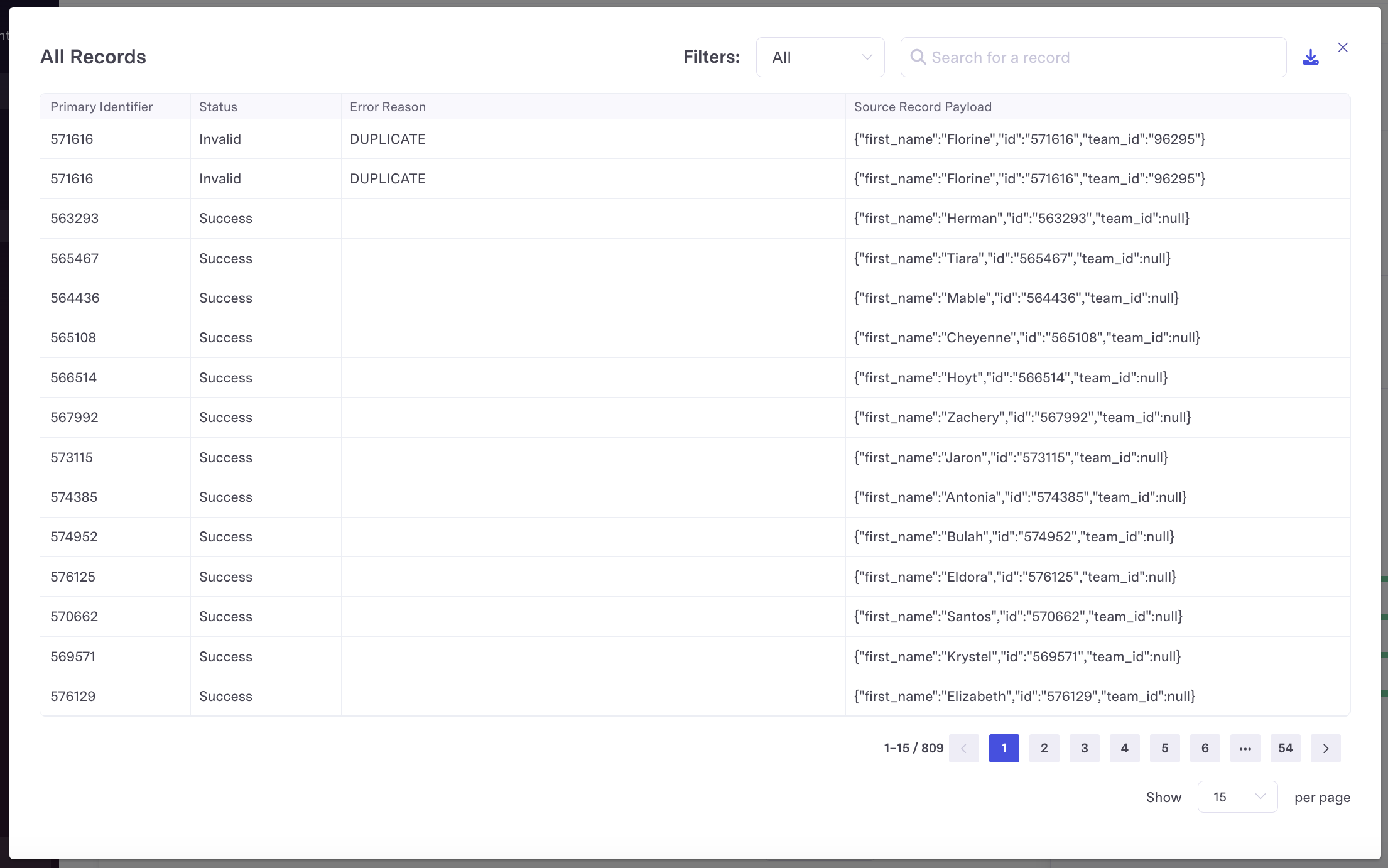
To use Sync Tracking, navigate to the Sync History page on the relevant sync. If a sync run falls within the 14-day retention period, a "View Records" button will be available. Click this button to open up the Sync Tracking modal and access detailed record information.

For each record, Activations will display
- The primary identifier
- Its status (Invalid, Rejected, or Success)
- The error reason, if applicable
- The source record payload that was processed
Reporting and Analysis
You can also choose to store Sync Tracking data yourself. This gives you to direct access to your sync tracking data, enabling custom analysis from your (and also allows you to retain sync tracking data for longer periods of time).
To access sync tracking data, follow the instructions in the Bring Your Own Bucket documentation. Once you configure your own bucket, Activations will automatically use it as storage for all sync run logging going forward. This data will be maintained permanently in your bucket unless you've specified your own retention policy.
Note that this data structure format applies to data written today but may change in the future.
Sync Tracking data is updated in batches while a sync is in progress. Activations' sync engine processes records in batches of 10-100k. Sync Tracking data will update as each batch is finished processing.
Sync Tracking is not currently available for Sync Dry Runs.
Sync Run Folder Structure
Sync Tracking data is organized into folders representing each individual sync runs within a hierarchical path.
s3://[your_bucket]/sync_tracking_datasets/[ORG_ID]/[SYNC_ID]/[SYNC_RUN_ID]/
Each sync run contains several files:
- One or more parquet files logging each individual row.
- A metadata file describing the configuration of the sync itself.
Synced Records Logs
Sync record data is stored in one or more parquet files of the format [batch_type].[batch_number].parquet, for example records_updated.0.parquet. Though there are different batch type prefixes, all files will have the same set of columns and can be joined together.
All files share the same schema so that they can be combined and queried. Sync tracking data includes the following columns:
| Column Name | Description |
|---|---|
| identifier | The value of the sync key for this particular record |
| record_payload | The full record payload extracted from the source as a JSON blob. This is not 1:1 with the data sent to the destination as this data can be conditional applied to the destination |
| operation | In most cases, this is the sync's behavior (update, upsert, delete, append). Mirror syncs in most cases will be separated into upsert vs delete operations, though file system and Sheets will continue to use mirror operator. |
| status | succeeded, rejected, NULL, or DUPLICATE (the latter two are invalid data checks automatically performed by Activations before attempting to sync) |
| status_message | The error message if it was rejected |
| batch_started_at | Timestamp when Activations started sending the batch of records |
| batch_ended_at | Timestamp finished sending the batch of records |
| sync_configuration_id | Added 2025-11-18 The ID of the Sync Configuration generating the synced records. Identical to the ID in the file path. |
| sync_run_id | Added 2025-11-18 The ID of the Sync Run generating the synced records. Identical to the ID in the file path. |
Metadata
In addition to the parquet files containing row-level sync tracking data, Activations writes a metadata.json file in the same path. This file includes sync run metadata:
- Organization ID
- Workspace ID
- Sync Configuration ID
- Sync Run ID
- Source and Destination type and IDs
- Sync Run start time
- Record Payload Schema which maps field names in the record_payload column of the data to their JSON types (string, number, boolean, array)
Use this metadata alongside your sync tracking parquet files to understand the schema and configuration details for each sync run, similar to the metadata tables available in Warehouse Writeback.
Fact Tables
In addition to row level sync logs, Sync Tracking will create fact tables about source objects and destinations involved in syncs. These tables will appear in the following path as individual parquet files:
s3://[your_bucket]/metadata/[ORG_ID]/
Fact Tables are refreshed every six hours, separate from sync runs history. That means you may see a delay on records appearing in metadata for syncs that are using brand new sources or destinations.
Source Objects Table
Source objects are tables, models, datasets, or segments. These are what you send data from during a sync. Continue reading the schema section below for more information.
| Column | Description |
|---|---|
| id | Unique identifier for the source object. This joins to the source_object_id column in the sync_log table. |
| type | Type of data set. The options with their meaning are: - DataWarehouse::FilterSegmentSource -> A segment- DataWarehouse::CohortSource -> A cohort- DataWarehouse::Query -> A model- DataWarehouse::BusinessObjectSource -> An entity- DataWarehouse::Table -> A table |
| name | Name of the data set. |
| model_id | For a source object with type DataWarehouse::Query, this points to the SQL, Looker, or dbt model associated with it.The model is what you see in the Activations UI and is what is responsible for storing a SQL query, dbt reference, etc. The DataWarehouse::Query source object lives between the model and your source and is responsible for translating the model definition into rows and columns. |
| business_object_id | For a source object with type DataWarehouse::BusinessObjectSource, this points to the Dataset associated with it. The Dataset (which is called a businessObject internally) |
| filter_segment_id | For a source object with type DataWarehouse::FilterSegmentSource, this points to the segment associated with it. The segment is what you see in the Activations UI and is where you configure conditional logic to segment your data. |
| cohort_id | For a source object with type DataWarehouse::CohortSource, this points to the segment experiment cohort associated with the sync. The cohort is the subset of a segment created when running an experiment. |
Destinations Table
Destinations are where you send data during a sync. An example is Salesforce.
| Column | Description |
|---|---|
| id | Unique identifier for the destination. This joins to the destination_id column in the sync_log table. |
| type | Type of the destination. This can be any of the various destinations we support, in the format <Destination name>::Connection |
| name | Name of the destination. |
Destination Objects Table
Destination objects are the specific objects within a destination that you send data to during a sync. An example is a Salesforce Contact.
| Column | Description |
|---|---|
| id | Unique identifier for the destination object. This joins to thedestination_object_id column in the sync_log table. |
| type | Type of the destination object. This can be any of the various destination objects we support, in the format <Destination name>::ObjectTypes::<Destination object name> |
| name | Name of the destination object. |
Querying
Because Sync Tracking data is stored as simple parquet files, you can query them in groups. For example, you can use duckdb to find all records that have failed and group by error message (Note: you'll need to grant access duckdb access to your object storage separately)
SELECT status_message, ARRAY_AGG(identifier) AS rejected_records
FROM read_parquet('s3://your_bucket/sync_tracking_datasets/1/2/3/*.parquet', union_by_name=True)
WHERE status = 'rejected'
GROUP BY 1