
Sync Lifecycle Webhooks
Sync Lifecycle Webhooks provide a way to connect external systems to Activations to listen for events related to a sync lifecycle, including Sync Alerts. Webhooks can be configured in Workspace settings under the Webhooks tab.
Creating a Webhook
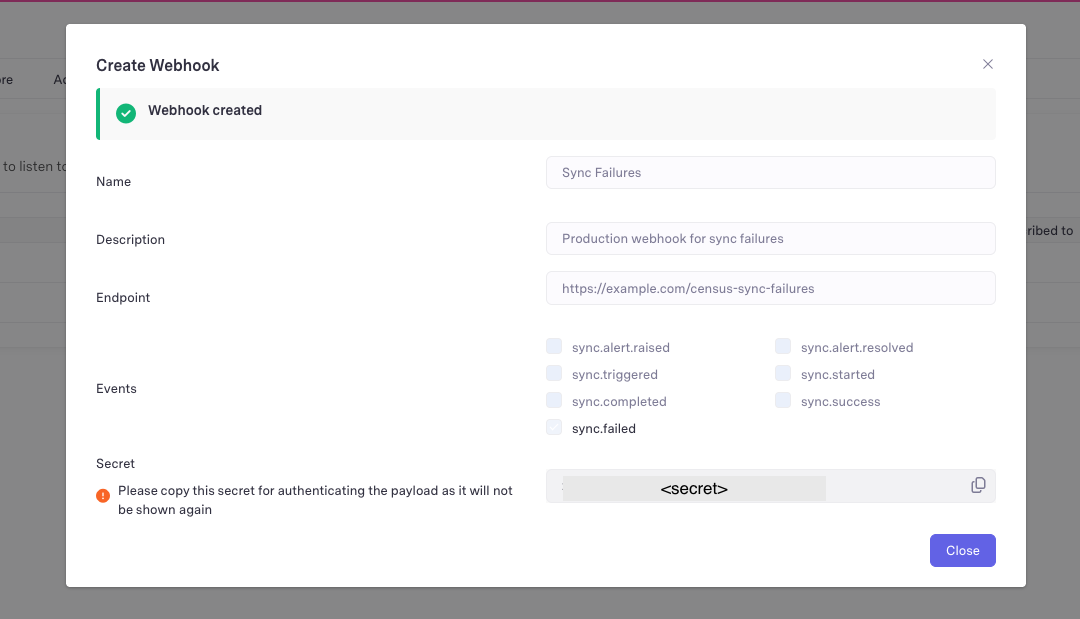
Configure a new webhook under the Webhooks tab by clicking Add Webhook and providing:
- Name - Required name for your webhook
- Description - Optional additional details or description for your webhook
- Endpoint - Required endpoint to which Activations should send payloads to
- Events - Subscribe to at least one of the supported events (See below)
Once you click Create, a one-time secret will be shown that you may use to validate the authenticity of the payloads you receive. Note that this secret will not be accessible later and it is recommended you make a copy of it.
Event Types
There are two main categories of events a webhook can subscribed to: sync alert events and sync run lifecycle events.
Sync Alert Events
- sync.alert.raised - when any subscribed sync alert in your workspace is triggered
- sync.alert.resolved - when any subscribed sync alert is resolved
Sync Run Lifecycle Events
- sync.triggered - when a sync run has been queued
- sync.started - when active work on the sync run has started
- sync.completed - when the sync run has completed, for both successful and failed sync runs
- sync.success - when a sync run is completed successfully
- sync.failed - when a sync run has failed
Payload Fields and Examples
Fields always present in the payload:
- workspace_id
- sync_id
- sync_run_id
- event
Additional fields present by event type:
- sync.completed
- status
- sync.alert.raised & sync.alert.resolved
- alert_instance_id
- alert_type
- message
- details
- followup_url
Payload Examples by Event
Please note the ids and messages in the below payloads are merely examples and the values will vary based on your individual workspace and configured sync alerts
sync.alert.raised
{
    "workspace_id": 3167,
    "sync_id": 3167956,
    "sync_run_id": 324402082,
    "alert_instance_id": 626248,
    "alert_type": "FailureAlertConfiguration",
    "message": "Sync Failed",
    "details": "Sync has failed with error: A mapped source column has been del
    eted: email",
    "followup_url": "https://app.getcensus.com/workspaces/3167/syncs/316795
    6/sync-history",
    "event": "sync.alert.raised"
}
sync.alert.resolved
{
    "workspace_id": 3167,
    "sync_id": 3167956,
    "sync_run_id": 324403394,
    "alert_instance_id": 626248,
    "alert_type": "FailureAlertConfiguration",
    "message": "Sync Recovered",
    "details": "Sync has recovered",
    "followup_url": "https://app.getcensus.com/workspaces/3167/syncs/316795
    6/sync-history",
    "event": "sync.alert.resolved"
}
sync.triggered
{
    "workspace_id": 3167,
    "sync_id": 3167956,
    "sync_run_id": 324399613,
    "event": "sync.triggered"
}
sync.started
{
    "workspace_id": 3167,
    "sync_id": 3167956,
    "sync_run_id": 324399613,
    "event": "sync.started"
}
sync.completed
{
    "workspace_id": 3167,
    "sync_id": 3167956,
    "sync_run_id": 324399613,
    "event": "sync.completed",
    "status": "ok"
}

If the sync run fails the status will be "emergency"

{
    "workspace_id": 3167,
    "sync_id": 3167956,
    "sync_run_id": 324402082,
    "event": "sync.completed",
    "status": "emergency"
}
sync.success
{
    "workspace_id": 3167,
    "sync_id": 3167956,
    "sync_run_id": 324399613,
    "event": "sync.success"
}
sync.failed
{
    "workspace_id": 3167,
    "sync_id": 3167956,
    "sync_run_id": 324402082,
    "event": "sync.failed"
}
Validating Webhook Payloads
To verify the webhook payloads your server receives are actually coming from Activations, use the secret from the creation flow to validate each payload. Each payload will include a HMAC-SHA256 X-Signature header calculated using the payload and secret token.
Example Python code for validating payloads:
import hmac
import hashlib
import base64

def validate_request(request):
    SECRET = b'<secret>'

    raw_body = request.body
    received_signature = request.headers.get('X-Signature')

    computed_signature = compute_hmac_signature(raw_body, SECRET)

    return hmac.compare_digest(received_signature, computed_signature)

def compute_hmac_signature(data, secret):
    digest = hmac.new(secret, data, hashlib.sha256).digest()
    return base64.b64encode(digest).decode()
Webhooks via API
See our developer docs on managing webhooks through the API.