
TikTok
This page describes how to use Activations with TikTok Ads.
Getting Started
- Navigate to the Destinations page in Activations and click New Destination.
- Select TikTok from the menu.
- Click Connect and you will be redirected to sign in to your TikTok for Business account.
- After completing the flow, you'll see your TikTok connection listed on the Destinations page.
Supported Objects and Sync Behaviors
| Object Name | Supported? | Sync Keys | Behaviors |
|---|---|---|---|
| Partner Audience | ✅ | Email, IDFA/GAID, Phone | Update or Create, Mirror |
| Customer File Audience | ✅ | Email, IDFA/GAID, Phone | Update or Create, Replace |
| Offline Event Conversions | ✅ | Any unique identifier | Send |
| Web Event Conversions | ✅ | Any unique identifier | Send |
Learn more about all of our sync behaviors in our Syncs documentation.
Contact Support if you want Activations to support more TikTok objects and/or behaviors.
Understanding TikTok Audiences
TikTok supports two different audience types: Partner Audiences and Customer File Audiences. Though they are similar, there are some important differences to note. When in doubt, we recommend using Partner Audiences.
You can enable an audience for Reach and Frequency campaigns using the toggle in the advanced configuration settings of a sync.
Partner Audiences
Partner Audiences are easier to manage with Activations as they have no limitations on incremental syncs.
Customer File Audience
TikTok only allows one Replace operation per 24 hrs (sometimes a bit longer, depends on their processing delays) when using this API. This can present issues. This error will appear as:
This replace operation is rejected as there is an existing unfinished replace operation for this audience. Please wait until the current operation completes on this audience before re trying. Recommend no more than one replace operation per day.
To work around this limitation, you have a few options:
- Use a Partner Audience instead
- Move to a less frequent sync schedule (once per 48 hrs)
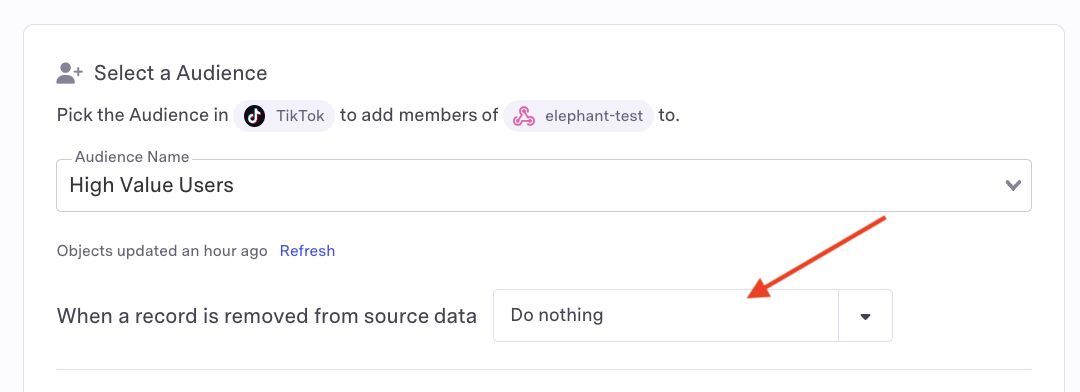
- Use the Update or Create sync behavior instead of Replace by setting the
When a record is removed from source dataoption toDo Nothingon sync set up
Identifiers
TikTok supports the following identifiers across either audience type:
- Email - Original value or SHA256 hashed
- Phone - Original value or SHA256 hashed
- IDFA/GAID - Original value, SHA256 hashed, or MD5 hashed
Prior to hashing, please ensure you are normalizing your data to TikTok's requirements.
Important Notes
- All audience identifiers can be provided as either the original value or a hashed value.