
Reporting Connectors
Reporting services provide performance data in the form of ad- or event-based reports about website visits and ads. They're unique because their APIs require that we query the data using a pre-defined report or by specifying a set of metrics and dimensions, rather than allowing us to extract all the underlying data of an account.
Supported services
Fivetran supports replicating report data from the following services:
- Adobe Analytics
- AdRoll
- Amazon Ads
- Apple App Store
- Apple Search Ads
- Criteo
- Facebook Ads
- Facebook Pages
- Google Ad Manager
- Google Ads
- Google Analytics 4
- Google Campaign Manager 360
- Google Display & Video 360
- Google Play
- Google Search Ads 360
- Google Search Console
- Instagram Business
- LinkedIn Ad Analytics
- LinkedIn Company Pages
- Marin Software
- Microsoft Advertising
- Outbrain
- Pinterest Ads
- Reddit Ads
- Snapchat Ads
- Spotify Ads
- Taboola
- The Trade Desk
- TikTok Ads
- X Ads
- X Organic
- Walmart DSP Private Preview
- Yahoo DSP Beta
- YouTube Analytics
If you'd like to integrate with another service, reach out to support.
Sync overview
- Open Authorization (OAuth) - OAuth lets you connect with Fivetran by directly logging into the application you're connecting with. It grants us restricted access to your account and protects your sensitive information. We use it for all APIs that support it. We recommend that you connect to a reporting service using OAuth if available.
- Dimensions, metrics, and reports - In the connection setup form, select the dimensions and metrics you want to include in your custom report or select a prebuilt report, which is a pre-defined combination of dimensions and metrics. Not all reporting connectors support both report types. To check for support, see the relevant connector's documentation.
For entities related to dimensions and metrics, we utilize the names provided by the respective source service platforms, as they are presented in their user interfaces and documentation.
- Initial sync - Fivetran discovers all available standard and custom objects and automatically pulls all historical data for all objects it has access to. Some report connectors allow you to specify a historical sync time frame, which is the number of months' worth of reporting data you'd like to include in your initial sync. Some reporting connectors support priority-first sync.
- Transform and map schema - Fivetran parses through all data, typecasting and mapping every column in the source object to a column in a corresponding destination table.
- Load - Fivetran automatically creates a table for each mapped source object. Initially, Fivetran populates these tables with historical data collected during the initial sync.
- Incremental syncs - After the initial sync, Fivetran incrementally syncs data using a merge operation (upsert and insert) based on the set sync schedule.
- Rollback sync - Some reporting connectors support rollback syncs that automatically run once a day and capture the changes that happen outside the incremental sync time frame, including metrics that may have been revised after your last sync. See the Rollback Sync Overview section for more information.
- Priority-first sync - Some reporting connectors support priority-first syncs that fetch your most recent data first so that it's quickly ready for you to use.
Rollback sync overview
Reporting applications often revise data they had already reported on. To keep your synced data accurate, Fivetran reporting connectors use a rollback sync to refetch and overwrite a trailing window of already-synced data on a schedule.
Some connectors, or the reporting applications themselves, may use a different term for rollback sync: lookback window, attribution window, or conversion window.
The table below displays each reporting connector's rollback sync:
| Connector | Rollback mechanism | Configurable | Applies to |
|---|---|---|---|
| Adobe Analytics | 1-day trailing overlap on every incremental sync. Defaults to 0 once the sync is more than 7 days behind schedule. | No | All report-suite tables |
| AdRoll | 2-day rollback window. | No | All ad performance/conversion reports |
| Amazon Ads | Rollback window sized by the Click Attribution window option. Default is 30 days, but Sponsored Brands reports are fixed at 14 days. | Configurable through the Click Attribution window setup field. Possible values: 1, 7, 14, 30 days | Sponsored Products and Sponsored Display reports |
| Apple App Store | Differs by report family: - Sales reports use a 3-day rollback window. - Finance reports use a larger 30-day rollback window, matching the source application’s finance-report revision lag. - Analytics/app-usage reports skip rollback syncing and instead retry reports that weren’t available when first fetched. | No | Sales, Finance, and Analytics/app-usage tables |
| Apple Search Ads | 5-day rollback window. | No | Ad group, campaign, keyword, search term, and ad level reports |
| AppsFlyer | Default 2-day rollback window for aggregate reports. | Configurable through the Rollback Window setup option. Possible values: 2-90 days | Geo Daily, Partners Daily (no rollback on Creative reports) |
| Microsoft Advertising | Rollback window sized by the Rollback Window Size setup option. The default window is 35 days. | Configurable through the Rollback Window Size setup option. Possible values: 35-95 days in 5-day increments | Report/conversion-metric tables |
| Criteo | Rollback window runs once a day in the account’s local time zone. The default window is 30 days (5 days for the Log Level prebuilt report). | No | All ad performance report endpoints |
| Facebook Ads | Up to a 28-day rollback window, depending on the attribution window selection for each report. | Configurable per report through the Attribution windows setup option. Possible values: 1, 7, 28 days. However, floored at 9 days according to Meta's own data-stabilization guidance. | Ad performance/insights reporting tables (Pages tables use a separate fixed window) |
| Facebook Pages | 5-day rollback window equal to the incremental sync window. | No | Page insights/analytics tables |
| Google Ad Manager | 15-day rollback window. | No | Report tables and enabled metadata tables (Ad Unit, Company, Creative, Line Item, Order, Placement) |
| Google Ads | Sized by the Conversion Window Size option. The default is 30 days (auto-detected per account when set to AUTO); rollback window equals the conversion window plus 1 day for most reports; fixed at 3 days for date-time segmented reports. | Configurable through the Conversion Window Size setup option. Possible values: AUTO (auto-detected from the account’s own attribution settings) or a manual value from 1-90 days | Timeline and campaign-insight reports use the conversion-window-derived rollback. Date-time segmented reports use a fixed 3-day window. |
| Google Analytics 4 | Default 30-day rollback window. The default falls back to a 2-day data latency window for tables that exceed the API quota. | Configurable per custom report through the Rollback window setup option. Possible options: 2-90 days, defaults to 30 if left blank | Each configured custom report |
| Google Campaign Manager 360 | Default 30-day rollback window for most connections (set per report). Some legacy connections default to 7 days for DAY/WEEK-timeline reports, or 30 days for MONTH/DV360-metric reports. | Confgurable per-report Possible values: 1-90 days | Each configured report |
| Google Display & Video 360 | Default 31-day rollback window. | No | All standard and custom reports |
| Google Search Ads 360 | Default 30-day rollback window. | Configurable per-report through the Rollback window setup option. Possible options: 2-90 days | Each configured report |
| Google Search Console | Default 7-day rollback window, aligned with GSC’s own data-finalization delay. | No | All search analytics report tables |
| Instagram Insights | Default 3-day rollback window. Note: Bounded by Instagram’s 180-day data retention limit. | Partially configurable; only for initial sync depth through the Timeframe in Months setup option. | USER_INSIGHTS table |
| Iterable | No rollback sync. | ||
| Klaviyo | Default 5-day rollback window for the Flow report sync. | Configurable per custom report through the Rollback window setup option. | Flow, Segment, and Form series reports |
| LinkedIn Ads | Default 30-day rollback window. | Configurable through the Post-Click Attribution window (possible values: 1, 7, 28, 30 days, defaults to 30) and View-Through Attribution window (possible values: 1, 7, 28, 30 days, defaults to 7) | Ad performance/analytics reporting tables |
| LinkedIn Company Pages | Default 4-day rollback window with a 3-day incremental window. | No | Company page statistics tables |
| Outbrain | Default 30-day rollback window. | No | Campaign, Promoted Link, Geolocation, Section, and Publisher reports |
| Pinterest Ads | Rollback window sized by the Click Attribution Window setting, floored at 7 days. The rollback window is 7 days or the value of the Click Attribution Window, whichever is larger. Click attribution window defaults to 30 days; custom monthly-granularity reports use a fixed 32-day window. | Configurable through the Click Attribution Window and View Attribution Window setup options, overridable per custom report. Possible values: 0, 1, 7, 14, 30, 60 days | All standard and custom ad report tables |
| Reddit Ads | Default 30-day rollback window. | No | Report tables and associated conversions tables |
| Snapchat Ads | Default 28-day rollback window. | Configurable through the Swipe Attribution Window. Possible values: 1, 7, 28 days. Note: View Attribution Window must be less than or equal to the Swipe Attribution Window. | Standard and custom report tables |
| Spotify Ads | Default 90-day rollback window for daily reports; 13-day rollback window for hourly reports. | No | All ad account report tables |
| Taboola | Default 31-day rollback window. | No | All campaign, account, and platform-level report tables |
| The Trade Desk | The re-fetch window depends on the report’s schedule frequency set in The Trade Desk application and rows from each execution are appended rather than merged. | No, except by changing the Report Date Range directly on your The Trade Desk account. | Report tables (per report schedule) |
| TikTok Ads | Default 7-day attribution window plus a 2-day latency buffer, for 9 days total. | Configurable through the Rollback sync setup option. Possible values: 1, 7, 14, 28 days | All ad/campaign/ad group/advertiser performance report tables |
| X Ads | Default 15-day rollback window with a 5-day incremental window. | No | Campaigns, line items, tweets, reach reports, and other ad performance tables |
| X Organic | Default 15-day lookback. Falls to 0 if the sync is more than 15 days behind schedule. | No | Organic tweet/account reports |
| Yahoo DSP | Rollback window, sized by the report time granularity: - Hour: 3 days - Day/Cumulative: 30 days - Week: 35 days - Month: 60 days | No | All reporting-API report tables |
| YouTube Analytics | Differs by data path. Bulk/system-managed reports rely on Google’s own report-regeneration signal: each regenerated report carries a newer creation timestamp, which the connector detects and resyncs against, with no fixed calendar window. The Audience Retention report uses a 3-day fixed rollback window. | No | Standard channel/content-owner report tables; Audience retention table |
For more connector-specific information, visit the relevant connector's documentation.
Schema information
Each connection maps to a single or multiple tables in a schema, depending on the service. Typically, we create one table per source object.
Connection mapping
For services that only support exporting pre-aggregated reports, such as Google Analytics or Google Ads, Fivetran offers reporting connectors. For each report, the reporting connection (shown below in the blue connection icon circle) creates a single table inside whichever schema you specify. You can have multiple tables in a single schema. All Fivetran reporting connectors are pull connectors.
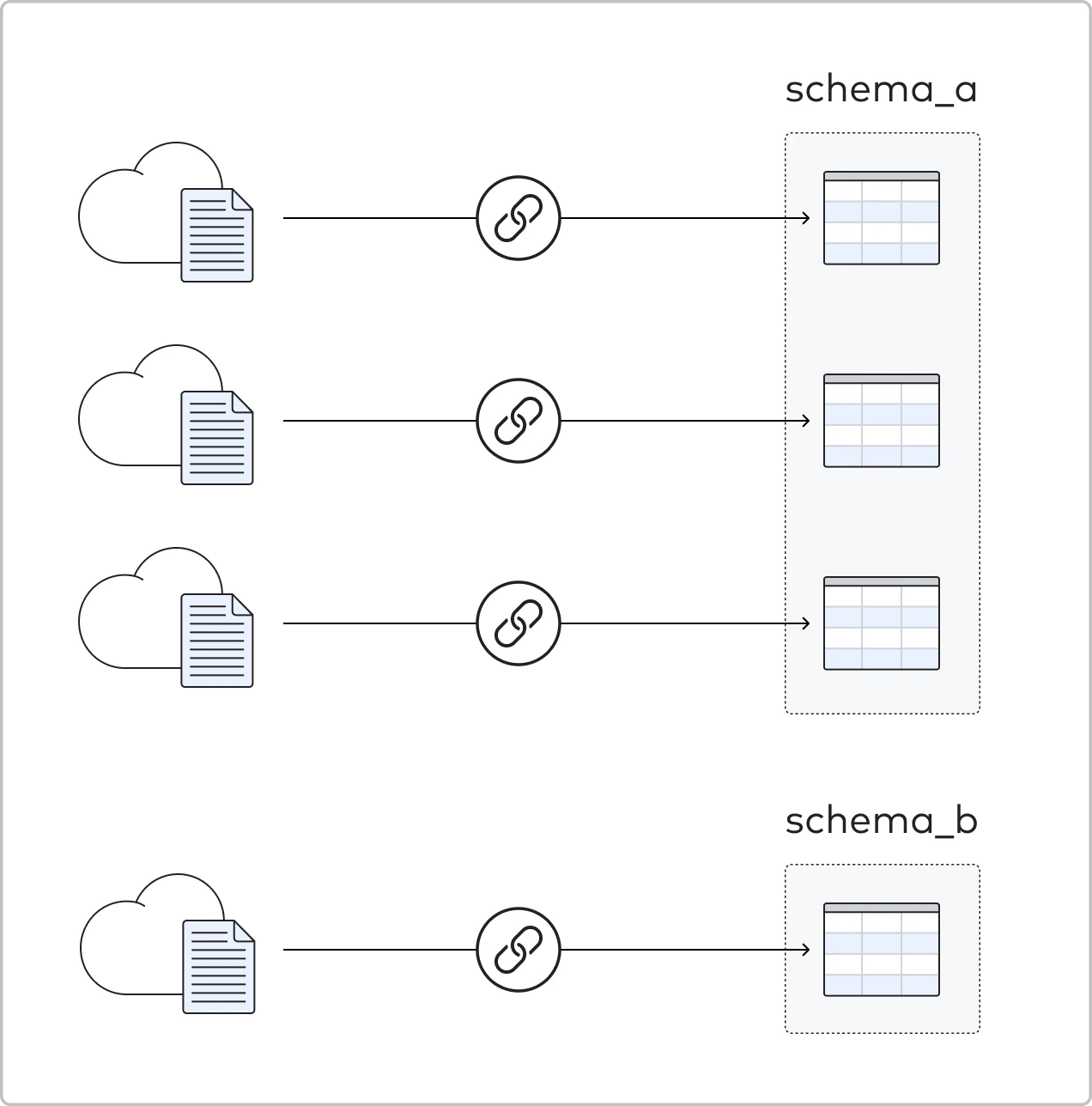
A key difference between Fivetran's reporting connectors and our other pull connectors is the amount of configuration required during setup. Because there are many available reports, you must select which report you want to sync when adding the connection in Fivetran.
Depending on the service, while setting up the connection, you may be prompted to select report types or a set of columns, dimensions, or metrics that you would like to include for each report.
Naming
During the connection setup, in the setup form of your Fivetran dashboard, you can name the schema as it will appear in your destination.
Excluding source data
You can decide what data to sync depending on the account type you connect. You can then limit the connection to whichever dimensions you select in the setup form of your Fivetran dashboard.
Updating data
After the initial sync that loads historical data, Fivetran only pulls incremental updates of any new or changed data from the source. Depending on the selected sync mode, we add the following extra column to each of your tables:
For Soft Delete mode:
_fivetran_synced(INSTANT)
For History mode:
_fivetran_active(BOOLEAN)_fivetran_start(INSTANT)`_fivetran_end(INSTANT)
Refer to the relevant connector's documentation page to learn whether it supports History mode.
To make these incremental updates, Fivetran maintains an internal set of progress cursors, which are recorded when an update syncs successfully. This provides an airtight handoff between syncs so that no data is ever missed. Because of this, Fivetran's system is extremely tolerant to service interruptions. Suppose there is an interruption in your pipeline, such as your destination going down. In that case, Fivetran will automatically resume syncing exactly where it left off after your destination is live again (even days or weeks later).
Frequency of updates
The default sync frequency is once every 6 hours. You can change it on the Setup tab of the Connector Details page in your Fivetran dashboard.
Deleted data
Deleted data is not really a concept in any of the reporting APIs, so we do not propagate any deleted data to your destination.
Conversion window size
Some report connectors that support rollback sync allow you to select a Conversion window size or similarly named property that indicates the period of time during which conversions are recorded.